iCreateOFX Basic v4 - The Statement Information dialog.
NOTE: This version of the program is no longer maintained nor supported. For new users, please use the currently supported versions.
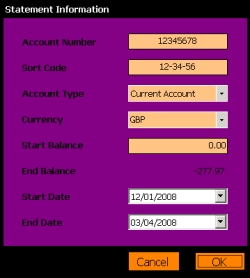
Some banks include this information in the CSV downloads, and in some instances, we utilise this information to populate these fields. You will, however, still need to confirm these.
By default, the dates in this dialog are set to the earliest and latest dates contained in the loaded transactions date range. This may not necessarily represent your statement anniversary dates, and you should change these to reflect that if necessary.
NOTE: If the opening and ending dates are the same, you willneed to increment the End Date by one day in order to proceed and write a valid OFX file.
You can change statement information before finally committing to writting the OFX file, however, to proceed from this stage, you will have to complete the details. Select OK to proceed from this screen.