iCreateOFX Basic v4 Extended functionality - Adding Other Banks.
NOTE: This version of the program is no longer maintained nor supported. For new users, please use the currently supported versions.
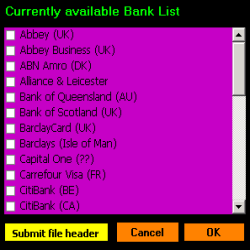
You will be presented with the Currently available Bank List dialog listing the scripts on our server. Select your required script if it is listed and select OK. If, however, your bank is not listed, to add support for your bank, select Submit file header to have it included. Its worth a mention that support for unlisted banks is dependent on users submitting their respective banks's file header layout.
The scripts downloaded via this method will be listed under the 'Other Banks button located on the Bank Scripts Stack.
Note: Starting with Version 3, added bank scripts will be listed in the main Script Stack. On completion of the downloading process, you will be prompted with the Script Setup dialog (image below). The downloaded scripts will be automatically included in the Currently Active Bank Scripts list. You can choose to change the positioning of the script in the stack and select OK.
