iCreateOFX Basic v4 - Extended functionality - CSV file header layout.
NOTE: This version of the program is no longer maintained nor supported. For new users, please use the currently supported versions.
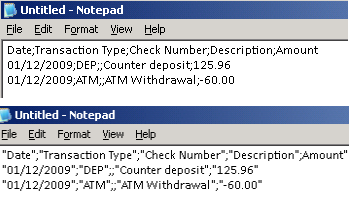
Some banks include other account information before listing the transactions. This information can be excluded from your submission only if it is not on the same line or row as the rest of the column descriptions. Alternately, anonymize this information before submitting the header.
For versions that provide for notification request, please enter your email if you wish to be notified by email when the script has been uploaded to our servers by selecting Notify me checkbox.
Important: Please send us a header that describes the columns in your file, e.g 'Date, Transaction Type, Check Number, Description, Amount' PLUS a couple of transaction lines as illustrated in the image on the left. Utilise a plain text editor such as Notepad or Wordpad to open your CSV file.