iCreateOFX Basic v4 - Extended functionality - Generic Scripts.
NOTE: This version of the program is no longer maintained nor supported. For new users, please use the currently supported versions.
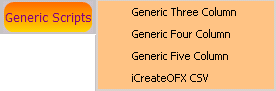
Of note here is that if your bank is not listed under the Other Banks button, it may be that the format of your file falls within the generic layouts that are included in the software. To ascertain this, you will have to inspect the structure of your file to see if it equates to these layouts. Below is a brief description of each of the Generic layouts.
Generic Three Column: This consists of the 'Date' in the first column, followed by the 'Description' and finally the 'Amount'.
Generic Four Column: This consists of the 'Date' in the first column, followed by the 'Description' which is then followed by the 'Debit Amount' and finally the 'Credit Amount'.
Generic Five Column: The only addition to this is an extra text column for 'Details / MEMO'.
iCreateOFX CSV: Begining with Version 2, you can save any file loaded into the grid to CSV. The layout is as follows: Date, Details, MEMO, Transaction ID, Amount
NOTE: The order in which notation of Debit or Credit is not critical, however care should be taken NOT to classify a BALANCE column as an Amount column. Additionally, these scripts assume that the file is delimited by a comma AND NOT qualified by double quotes ("").